(!)NOTE : Windows 7 users won’t be able to use some latest features of eCatalog/WOS since Microsoft is ending support for Windows 7 on 14 Jan, 2020. Please upgrade your system for uninterrupted services.

  • We are upgrading our website for a better purchasing experience. Stay tuned for more updates! Know more
  • IMPORTANT: Please remember your log-in details, as you need to re-log in post the website upgrade. Reset in case: Forgot log-in ID OR Forgot Password

Enhanced ordering experience
Faster, Simpler & more Flexible for you.

Join our upcoming webinars to easily understand and use our new user interface.
Click Here to Apply

⚠️Important - MISUMI Account Login Credentials 👨🏻‍💻

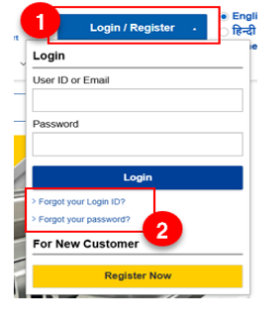
After the update, you will be logged out of your MISUMI account and will need to log back in. Please take a note of your login credentials (ID/Password) beforehand. In case you forgot your login credentials, please reset your details from our top page, or below;

If you forgot your Login ID: ➤ Click Here | If you forgot your PASSWORD: ➤ Click Here
💡Frequently Asked Questions


MISUMI India is upgrading its internal ordering system to provide a faster, simpler, and more flexible ordering experience. The new system improves quote creation, order processing, stock visibility, shipping options, and profile management. Please refer to the ➤ QUICK GUIDE
The new system will go live on 23rd February.
Yes. Your existing login credentials, account details, and customer information will remain unchanged after the upgrade. You will simply need to sign in to your account again once the new system is live. As the cache date will get refreshed, please note down your log-in credentials before 23rd February. In case you do not know your log-in details, simply reset your log-in credentials from our website.
login
The upgraded system offers simplified and faster quote and order flow, helping you complete transactions with fewer steps and improved clarity. Please refer to the ➤ QUICK GUIDE
You will be able to easily view available stock quantities during ordering. If you require quantities beyond the available stock,you may reach us by clicking on "Contact us" and mentioning the required quantity and preferred shipment date. Please refer to the “Quick guide” section on top (left) of this page for details.
For selected items, you can now split shipments and receive products on different dates based on availability, giving you more control over delivery planning. Please refer to the ➤ QUICK GUIDE
Yes. The new system allows you to add, edit, or change shipping addresses directly during checkout, making profile and address management more convenient. Please refer to the ➤ QUICK GUIDE
MISUMI aims to ensure minimal disruption. So we will carry out the system update on 22nd February (Sunday) to ensure a smooth and enhanced experience when the new features go live. Any important updates will be communicated to customers in advance.
No immediate action is required. We recommend reviewing the updates once the system is live to take full advantage of the new features. As the cache date will get refreshed, please note remember to note down your log-in credentials before 23rd February. In case you do not know your log-in details, simply reset your log-in credentials from our website.
login
No. Existing orders and quotations will not be impacted by the system upgrade.
This upgrade is part of MISUMI’s commitment to delivering a better digital experience, improving efficiency, transparency, and flexibility for our customers.
whatsapp-qr whatsapp-icon